Download free KPI templates in Excel and Google Sheets below. Start with the Staff KPI Scorecard. It has weightage, automatic scoring and a rating, and each KPI row includes the formula, baseline, target, owner, review frequency and action if the target is missed.
Key takeaways
- 8 free templates: staff scorecard (English and BM), department tracker, appraisal-to-bonus calculator and 4 KPI dashboards.
- Fill in the yellow cells only. Scores, ratings and status calculate automatically.
- Every KPI row needs: formula, baseline, target, owner, review frequency and action if missed.
- Example values are illustrative. Replace them with your own targets.
- When several departments update every month, consider moving from Excel to KPI software.
By Bernard Yong, Chief Software Engineer and co-founder, DoerHRM.
Download the free KPI templates (Excel and Google Sheets)
Choose the template that matches what you need to do. All files work in Microsoft Excel and can be imported into Google Sheets.
| Template | Best for | What it does | Download |
|---|---|---|---|
| Staff KPI Scorecard (NEW) | Setting and scoring one employee’s KPIs | Weightage, achievement cap, “higher/lower is better”, automatic score and rating 1–5 | Excel |
| Kad Skor KPI Pekerja (BM) (NEW) | The same scorecard in Bahasa Malaysia | Identical features, Malaysian BM labels and instructions | Excel |
| Department KPI Tracker (NEW) | Monthly department reviews | 12 monthly columns, average to date, status On track / Watch / Behind | Excel |
| Appraisal-to-Bonus Calculator (NEW) | Turning KPI ratings into bonus | Rating → multiplier → bonus, with automatic scaling to your budget | Excel |
| Simple KPI Dashboard | A first KPI dashboard | Visual summary of a few KPIs | Excel · Google Sheet |
| KPI Performance Dashboard | Management overview | Performance by KPI and period | Excel · Google Sheet |
| Project Management KPI Dashboard | Project teams | Project KPIs such as schedule and budget | Excel · Google Sheet |
| Efficiency KPI Dashboard | Operations teams | Efficiency and productivity KPIs | Excel · Google Sheet |
Which KPI template should you use?
Use the Staff KPI Scorecard to set individual KPIs, the Department Tracker for monthly reviews, and the Bonus Calculator at year-end. The dashboards are for visual reporting to management.
- Setting KPIs for the first time? Start with the Staff KPI Scorecard. Read what a KPI is first if your team is new to KPIs.
- Running monthly department meetings? Use the Department KPI Tracker.
- Preparing year-end bonus? Use the Appraisal-to-Bonus Calculator with the method in our guide on how to calculate performance bonus.
- Reporting to management? Use one of the 4 dashboards.
How to use the Staff KPI Scorecard (1 minute)
Fill in the employee details, list 4–7 KPIs with weightage adding up to 100%, then enter actual results at each review. The score and rating calculate automatically.
- Enter the employee’s name, position, department and review period.
- For each KPI, fill in the formula, baseline (current performance), target, owner, review frequency and action if missed.
- Choose the direction: Higher if a bigger number is better (sales), Lower if smaller is better (cost, defects, days).
- Set weightage. The sheet checks that it adds up to 100%.
- Enter the actual result. Achievement is capped at 120% by default (change it in Settings), so one KPI cannot cover for weak results elsewhere.
- Read the total score and rating at the bottom. Rating bands are in the Settings tab.
Example in the file (illustrative): a Sales Executive with 4 KPIs scores 100.5% overall, rating 4 (“Exceeds”), even though monthly sales reached only 90% of target, because margin and new customers were strong.
How to use the Department KPI Tracker (1 minute)
List the department’s KPIs and monthly targets once, then enter each month’s actual result. Status turns green, amber or red automatically.
- List 5–8 department KPIs with owner, formula, direction and monthly target.
- Each month, enter the actual result in that month’s column.
- “Average to date” uses only the months you’ve entered.
- Status: On track (100% of target or more), Watch (90–99%), Behind (below 90%).
- In a 15-minute monthly meeting, write one action for every KPI marked Watch or Behind.
How to use the Appraisal-to-Bonus Calculator (1 minute)
Set the target bonus months, budget and rating bands once, then enter each employee’s salary and final KPI score.
- In Settings, enter the target bonus months (for example 1.5), the approved budget, and your rating bands and multipliers.
- In Bonus, enter each employee’s monthly basic salary and final KPI score.
- Rating, multiplier and calculated bonus fill in automatically.
- If the total is over budget, every bonus is scaled down by the same percentage.
All numbers in the file are examples. Check pro-rating, eligibility and statutory deductions such as EPF and PCB with your payroll team.
What should every KPI template include?
A usable KPI template includes 6 things for every KPI: formula, baseline, target, owner, review frequency and the action to take if the target is missed.
| Field | Why it matters | Example |
|---|---|---|
| Formula | Everyone calculates the KPI the same way | Collected within 60 days ÷ total invoiced |
| Baseline | Shows whether the target is realistic | 82% last year |
| Target | The result you want | 90% |
| Owner | One person is accountable | Sales Admin |
| Review frequency | How often you check | Monthly |
| Action if missed | What happens next | Follow up overdue accounts every Friday |
Without a baseline, targets are guesses. Without an owner and an action, a missed KPI is just a red cell. For help writing each KPI, see our SMART KPI guide and employee KPI examples.
When should you move from Excel to KPI software?
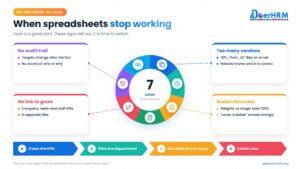
Excel works well for small teams. Move to software when files multiply, updates are chased by email or WhatsApp, or bonus depends on KPI scores across many departments.
Signs it’s time:
- More than one person edits the file, and versions get mixed up.
- HR spends days each quarter collecting updates.
- Department KPIs need to link to company goals and appraisal.
- Formulas break when someone inserts a row.
Our KPI software buyer’s guide has a 12-point checklist. In DoerHRM, the same scorecard, tracker and bonus logic run automatically, with monthly check-ins and approvals.
Frequently asked questions
How do I create a KPI template in Excel? List each KPI in a row with its formula, baseline, target, actual, weightage and owner. Add a formula for achievement (actual ÷ target, or target ÷ actual when lower is better), multiply by weightage, and sum the weighted scores. Our free Staff KPI Scorecard does this for you.
Is there a free KPI template in Bahasa Malaysia? Yes. Download the Kad Skor KPI Pekerja (BM) above. It has the same features as the English scorecard, with Malaysian BM labels and instructions.
How do you calculate a KPI score with weightage? Divide the actual result by the target to get achievement, cap it (for example at 120%), multiply by the KPI’s weightage, then add up all weighted scores. A total of 100% means the employee met expectations overall.
Can I use these templates in Google Sheets? Yes. Open Google Sheets, choose File > Import, and upload the Excel file. The formulas work in Google Sheets.
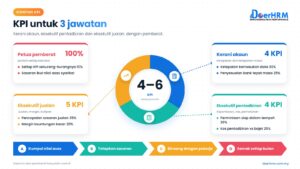
How many KPIs should a KPI template have? For one employee, 4 to 7 KPIs is usually enough. For a department tracker, 5 to 8 KPIs.
What is the difference between a KPI template and a KPI dashboard? A template is where you set and score KPIs. A dashboard shows the results visually for quick review by management.
Conclusion
Start with the Staff KPI Scorecard to set clear, weighted KPIs, use the Department Tracker for monthly reviews, and the Bonus Calculator at year-end. Make sure every KPI has a formula, baseline, target, owner, review frequency and action.
Set up your KPIs with the templates, then get help making them work across the company. Book a free session with a DoerHRM expert to see how the same scorecards run automatically.
Bernard Yong is Chief Software Engineer and co-founder of DoerHRM. He leads the development of DoerHRM’s KPI, OKR, appraisal and reward modules.