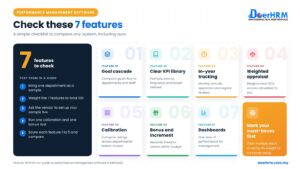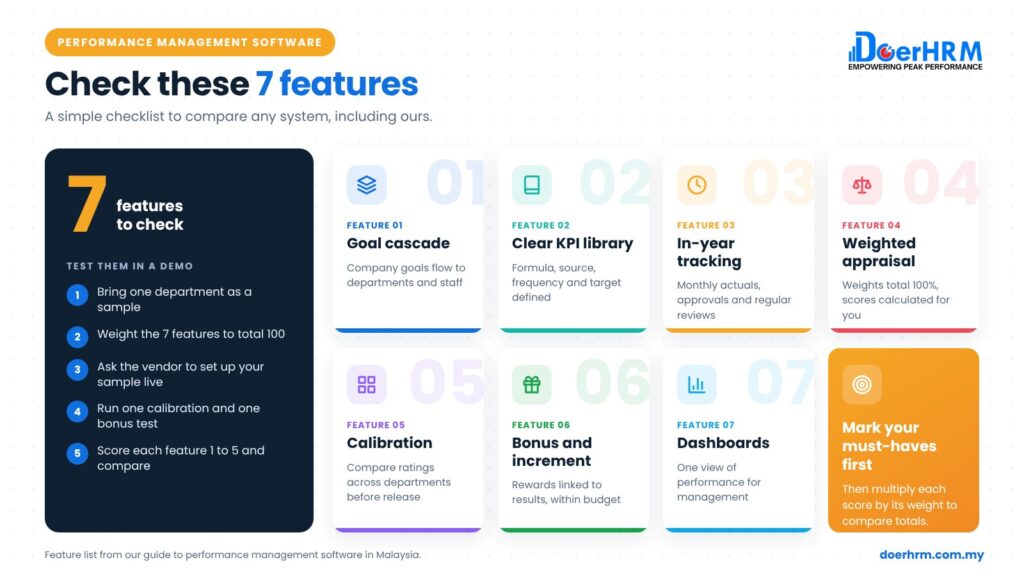
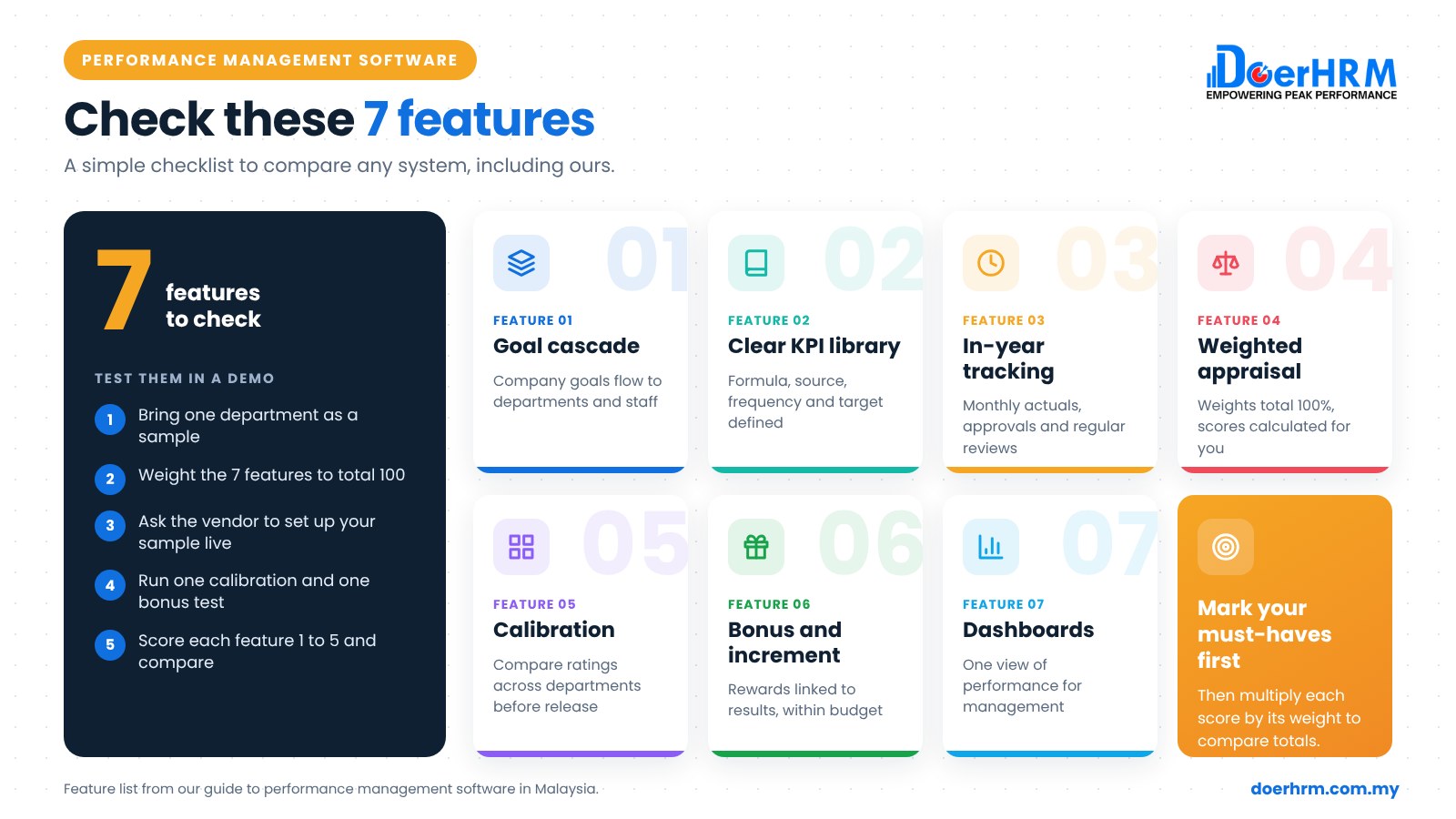
Good performance management software in Malaysia should do seven things: cascade goals from company to staff, define KPIs clearly, track progress during the year, score appraisals with weights, support calibration, link results to bonus and increment within budget, and show it all on dashboards. Check these features in any system before you compare prices.
Key takeaways
- Judge systems on the 7 features below, not on the length of the feature list.
- The cascade (company to staff) and weighted scoring are the core. Without them, you have a form tool, not a performance system.
- A 50-staff company needs fewer features than a 500-staff group. Do not pay for complexity you will not use.
- Test every feature in a demo with your own KPIs and org chart, not the vendor’s sample data.
- Payroll, leave and recruitment are usually separate HR modules. Ask how they connect.
By Bernard Yong, Chief Software Engineer and Co-founder of DoerHRM, who leads the team that builds DoerHRM’s performance management software.
What features should performance management software have?
Performance management software should cover the full cycle: setting goals, tracking them, appraising results, calibrating ratings and rewarding fairly. Seven features make that possible.
This article covers features only. For the buying process (budget, shortlisting, rollout), see our KPI software buyer’s guide for Malaysia. If you are still deciding whether to move off spreadsheets at all, read KPI software vs Excel first.
1. Strategy-to-staff cascade
The system should let you set company goals and cascade them to divisions, departments and individual staff, so everyone sees how their KPIs link to the company’s.
What to check:
- Enough organisation levels for your structure (for example, group, company, branch, department, section).
- Results that roll up automatically, and a view of goals not linked to anything above them.
2. Clear KPI definitions and a KPI library
Each KPI needs a formula, data source, frequency, target and direction (higher or lower is better). A KPI library saves managers from writing every KPI from scratch.
What to check:
- One KPI shared by many owners, each with their own target (for example, five branches).
- Custom formulas, a standard KPI library and your own company templates.
3. Tracking and check-ins during the year
Software should make monthly or weekly tracking easy, because a year-end appraisal without in-year data is mostly memory.
What to check:
- Monthly or quarterly tracking with year-to-date progress, and supervisor approval of actuals.
- Check-ins and 1-on-1 records, so coaching happens before problems grow.
4. Weighted scoring and flexible appraisal forms
The system should calculate weighted scores automatically and let you build appraisal forms that match your policy.
What to check:
- KPI weights that must total 100%, with the final score calculated for you.
- Competency ratings by job grade, self-rating and one or more evaluators.
- Different cycles for different groups (for example, probation, office and site staff).
5. Calibration and talent views
Calibration tools help HR and senior managers compare ratings across departments before final results are released, so one generous manager does not skew bonuses.
What to check:
- A 9-box view (performance vs potential) for talent discussions.
- A bell curve or rating distribution view, used as a guide, not a strict quota.
6. Link to bonus and increment, with budget control
The appraisal result should flow into reward decisions, with a check that the total stays within the approved budget.
What to check:
- Bonus and increment simulation against budget, with rules such as grade multipliers.
- A file you can pass to payroll, so figures are not retyped. For the method behind this, see how to calculate performance bonus in Malaysia.
7. Dashboards and analytics
Managers and HR need one view of KPI, appraisal and reward data, without exporting to Excel.
What to check:
- Dashboards by company, department and person, plus appraisal analytics such as rating spread.
- Who can see what (access by role), and a record of changes.
Which features matter at 50 staff vs 500 staff?
At 50 staff, focus on clear KPIs, tracking and simple weighted appraisals. At 500 staff, multi-level cascade, calibration, reward budget control and analytics become essential.
| Feature | Around 50 staff | Around 500 staff |
|---|---|---|
| 1. Strategy-to-staff cascade | Company to department to staff is usually enough | Essential across companies, branches and sections |
| 2. KPI definitions and library | Essential: one clear definition per KPI | Essential, plus shared company templates for consistency |
| 3. Tracking and check-ins | Essential: monthly tracking, regular 1-on-1s | Essential, with supervisor approval of actuals at scale |
| 4. Weighted scoring and forms | Essential: one or two form templates | Essential: several cycles and forms by staff group |
| 5. Calibration and talent views | Useful: often done in one management meeting | Essential: many managers’ ratings must be aligned |
| 6. Bonus and increment link | Useful: a spreadsheet may still work | Essential: budget simulation avoids costly errors |
| 7. Dashboards and analytics | Useful: a few key charts | Essential: management needs roll-up views |
How do you test these features in a demo?
Bring your own data and ask the vendor to show each feature live. Five steps keep the test fair.
- Prepare a sample. One department’s org chart, KPIs and appraisal form.
- Weight the 7 features for your company so the weights total 100.
- Ask the vendor to set up your sample live: cascade a KPI to one employee, enter actuals and run a weighted score.
- Run one calibration and one bonus simulation with your own rules.
- Score each feature from 1 to 5, multiply by the weight and compare totals. Then look at the must-have features separately.
Worked example: scoring two systems (hypothetical)
Hypothetical example: Aina, HR manager at a 120-staff manufacturer in Shah Alam, scores two systems after demos. The totals are close, so she decides on the features that matter most to her.
| Feature | Weight | System A score | System A weighted | System B score | System B weighted |
|---|---|---|---|---|---|
| 1. Cascade | 15 | 4 | 60 | 3 | 45 |
| 2. KPI definitions | 15 | 3 | 45 | 4 | 60 |
| 3. Tracking and check-ins | 15 | 4 | 60 | 3 | 45 |
| 4. Weighted scoring and forms | 20 | 5 | 100 | 4 | 80 |
| 5. Calibration | 10 | 2 | 20 | 4 | 40 |
| 6. Bonus and increment link | 15 | 3 | 45 | 4 | 60 |
| 7. Dashboards | 10 | 4 | 40 | 3 | 30 |
| Total | 100 | 370 (3.70) | 360 (3.60) |
System A wins, but only by 0.10. Aina’s company runs separate factory and office cycles and a yearly bonus pool, so calibration matters more than its weight suggested. She asks System A’s vendor to show calibration again. A weighted score narrows the choice; your must-haves decide it.
How does DoerHRM cover these features?
DoerHRM covers all seven features in one platform. The table maps each feature to the DoerHRM module, so you can check it in a demo like any other system.
| Feature | How DoerHRM covers it |
|---|---|
| 1. Cascade | 5 organisation levels (Corporate, Company, Branch, Department, Section) with results rolling up; OKR Strategy Map shows alignment coverage and orphan OKRs |
| 2. KPI definitions | KPI definition with formula, source, frequency, baseline, target and actual; higher or lower is better; one KPI with many owners; KPI Library |
| 3. Tracking | Monthly or quarterly tracking with YTD pacing; supervisor approval of actuals; check-ins and 1-on-1 meetings |
| 4. Scoring and forms | Weighted scoring; reusable form templates (weights total 100%); configurable cycles; self, primary and secondary evaluators; competency library by grade |
| 5. Calibration | 9-Box Matrix, Bell Curve and HR Calibration |
| 6. Reward link | Bonus & Increment with company profit gate, grade multipliers, budget vs simulation and payroll file export |
| 7. Dashboards | Central dashboard for KPI, OKR, appraisal and bonus data; Performance Appraisal & Analytics |
DoerHRM exports a payroll file; it does not run payroll. See the DoerHRM KPI and performance management software homepage, and the method in our KPI performance management guide.
Frequently asked questions
What features should performance management software have? At minimum: goal cascade from company to staff, clear KPI definitions, in-year tracking, weighted appraisal scoring, calibration, a link to bonus and increment with budget control, and dashboards.
What is the difference between performance management software and HR software? HR software usually covers records, leave, payroll and hiring. Performance management software focuses on goals, KPIs, appraisal, calibration and rewards. Some companies use both.
Does a small company need performance management software? Not always. At around 50 staff, good KPI setting and tracking matter most. Software helps once spreadsheets become hard to consolidate.
Should performance management software include OKRs? It helps if you use OKRs for strategic priorities alongside KPIs for ongoing results. Check that both link to the same goals.
How do I compare performance management systems fairly? Use the same sample department, the same 7 features and the same weights for every demo. Score each feature from 1 to 5, then check your must-haves separately.
Can performance management software calculate bonuses? Some systems simulate bonus and increment from appraisal results against your budget. Check whether it exports to payroll rather than running payroll.
Conclusion
Compare performance management software on the seven features that run the full cycle. Weight them for your company size, test them with your own data and let your must-haves make the final call.
Want to see these seven features working with your own KPIs and org chart? Book a demo with a DoerHRM expert and bring one department’s KPIs to test.
Bernard Yong is the Chief Software Engineer and Co-founder of DoerHRM. He leads the team that builds DoerHRM’s KPI, OKR, appraisal and reward modules, and writes about using software to track goals and performance with less manual work.